
A5 · Day 2 — Mastering identity
Layer 2 · Router + Layer 3 · Account + Proxy
Question of the day: Will my accounts survive?
Start small, start slow. Today you only touch 5 accounts, and most of the time is spent waiting.
Why accounts get banned in clusters
Section titled “Why accounts get banned in clusters”An account is an identity. A proxy is that identity’s home address.
If 20 accounts share one address, the platform sees 20 people living in the same house, waking and sleeping at the same time, liking the same kind of content. That is why accounts get banned in clusters rather than one by one.
GenRouter exists so that each phone has its own address. Isolate Mode does one more thing: if a proxy dies, it cuts that phone’s network immediately instead of letting the phone expose your real address.
graph TB
    subgraph SAI["✕ Wrong — 20 accounts, 1 address"]
        P0["1 proxy"] --> A1["Acct 1"] & A2["Acct 2"] & A3["… Acct 20"]
    end
    subgraph DUNG["✓ Right — one address per phone"]
        P1["proxy 1"] --> B1["Acct 1"]
        P2["proxy 2"] --> B2["Acct 2"]
        P3["proxy …"] --> B3["Acct …"]
    end
Prepare accounts + proxies → Assign proxies + Isolate Mode → Install the platform app → Log in by hand as a test → Import the account sheet → Run a simple job so the accounts get warmed up
Prepare 5 accounts and 5 proxies
Section titled “Prepare 5 accounts and 5 proxies”If you want to save money for the trial, 5 accounts spread over 2–3 proxies is acceptable, but remember that this is not a real production setup.
Assign a proxy to each phone and turn on Isolate Mode
Section titled “Assign a proxy to each phone and turn on Isolate Mode”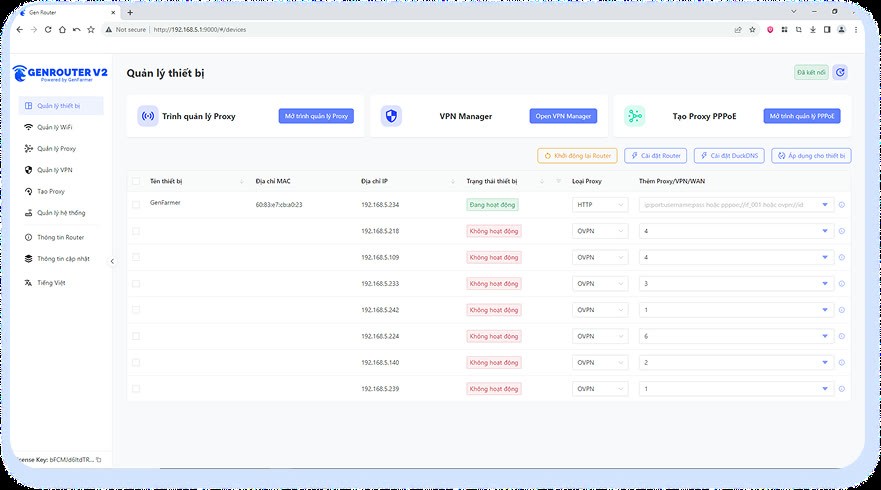
Open the GenRouter control panel at 192.168.5.1:9000, assign a proxy to each phone, and turn on Isolate Mode.
Install the platform app on the phones
Section titled “Install the platform app on the phones”Download the APK file, select all phones, and click Install APK. HDSD p. 17 · 51 · 78 · 102 · 124
Install it on every phone today: Day 2 is when you start logging accounts in gradually to let them settle, so installing in advance saves work on the following days.
Official APK folder (includes TikTok, Facebook, Instagram, X, Spotify): APK_GENFARMER — Google Drive
Log in to 1–2 accounts by hand
Section titled “Log in to 1–2 accounts by hand”Go slowly and watch every step.
Create an account sheet in Account Manager
Section titled “Create an account sheet in Account Manager”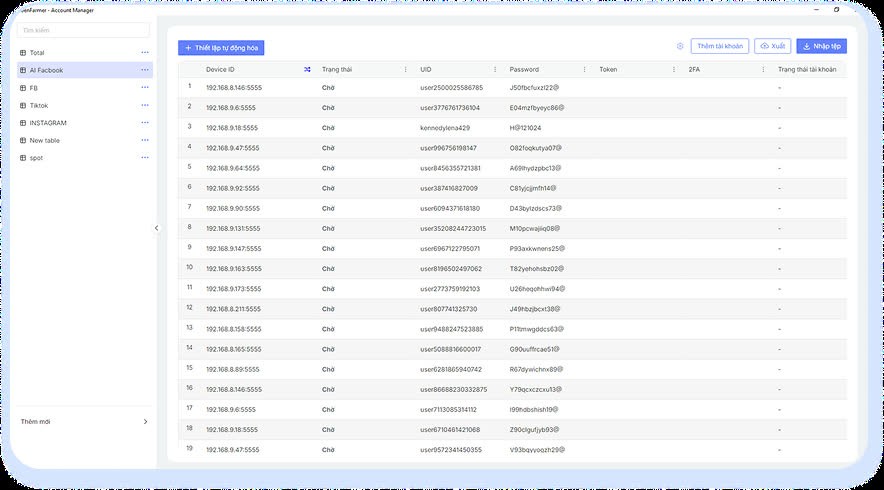
Only do this once the 1–2 accounts from the previous step are stable. HDSD p. 10–11
Enter all 5 accounts into the sheet
Section titled “Enter all 5 accounts into the sheet”The default format is UID|Password|2FA; to change it, go to Custom. HDSD p. 11–13
Assign a device to each account
Section titled “Assign a device to each account”Copy the Device ID from the main screen and paste it into the Device ID column. HDSD p. 14–15
Leave everything alone for 48 hours
Section titled “Leave everything alone for 48 hours”Do not run anything. This is not dead time — this is the test.
Done when
Section titled “Done when”Three common mistakes
Section titled “Three common mistakes”| ✕ | Mistake | Consequence |
|---|---|---|
| 1 | Buying 20 accounts right away to fill the whole set | You lose all 20 in a single night |
| 2 | Sharing one proxy across many accounts to save money | Accounts get banned in clusters, and you wrongly conclude the hardware is at fault |
| 3 | Logging in to many accounts on the same phone one after another in a short time | No real person does that |